Delete your account
How to permanently close your RAYS CARD account, and what happens to your data and balance.
Last updated: July 9, 2026
You can permanently close your RAYS CARD account from the app. Deleting your account is permanent and cannot be undone, so please review the notes below before you start.
Before you start
- Your account will be locked immediately.
- All cards will be suspended.
- Any remaining balance is processed according to our refund policy.
- Some records are retained for the period required by law (for example anti-money-laundering records). See the Privacy Policy for details.
Steps
1. Open the Settings tab
Open the app and tap the Settings tab at the bottom of the screen.
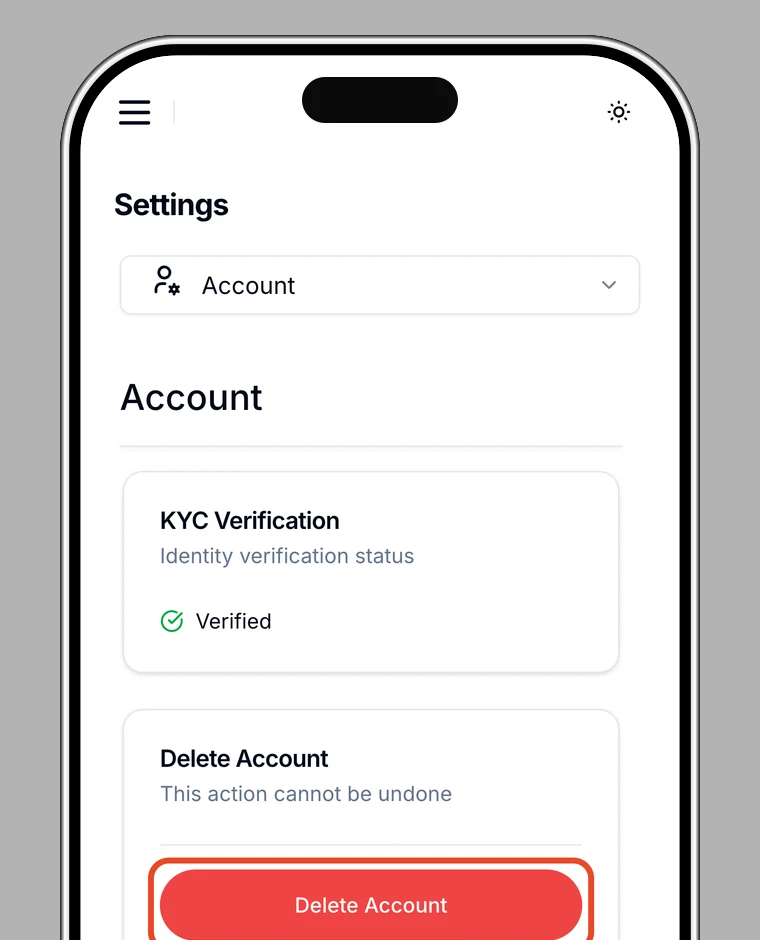
2. Tap "Delete Account"
Scroll to the bottom of the Settings screen and tap Delete Account (shown in red).
3. Review the notice, then tap "Close My Account"
Read the description and the important notes, then tap Close My Account.
4. Confirm
In the "Close Account?" dialog, tap Yes, Close Account.
5. Verify your identity
For security, verify your identity to authorize the closure.
6. Done
When you see "Account Closure Requested", your request is complete.
After you close your account
- Your account is locked immediately and all cards are suspended.
- Our team processes the closure and your personal data is permanently deleted, except for records we are legally required to keep, as described in the Privacy Policy.
- Any remaining balance is handled under our refund policy.
Need help?
If you can't complete these steps, contact us from the app (Settings → Support) or visit the Help Center.